
AI quotation comparison, without the retyping.
| Item | Varnel | Ostrand | Kelvane |
|---|---|---|---|
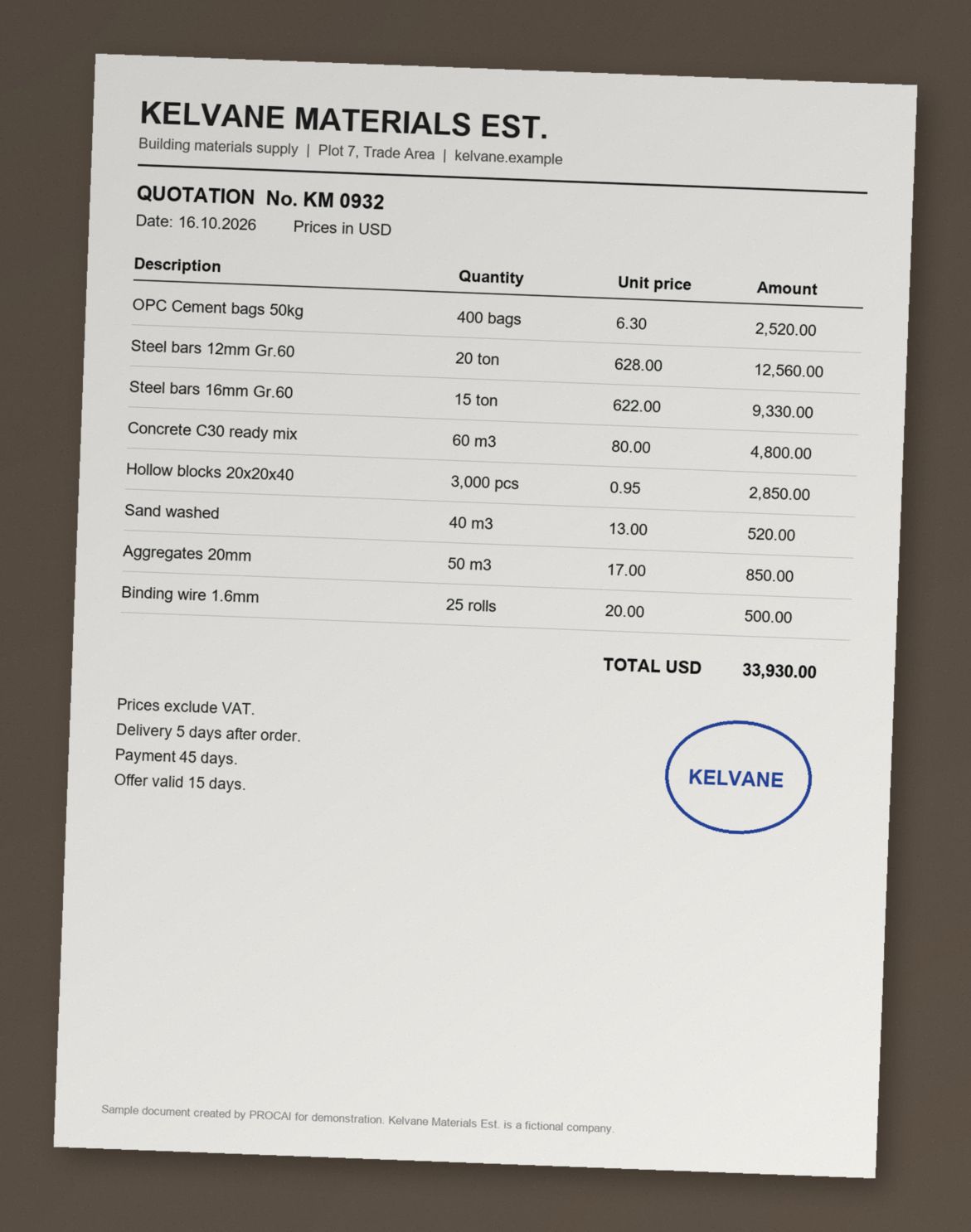
| Portland cement, 50 kg400 bags | 6.10 | 5.85 | 6.30 |
| Rebar 12 mm, Grade 6020 tons | 640.00 | 655.00 | 628.00 |
| Rebar 16 mm, Grade 6015 tons | 630.00 | 645.00 | 622.00 |
| 5 more lines in the full result. | |||
| Total (USD) | 34,165.00 | 33,442.50* | 33,930.00 |
Lowest price on each line.
* After a 2% discount, without the binding wire it did not quote.
PROCAI recommends: Ostrand, the cheapest by 1.4%, once it confirms the binding wire and the 50% advance payment.
Upload the quotations your suppliers sent, in whatever layout they used. PROCAI builds one side by side comparison sheet with the line items matched, each offer's currency and VAT stated, and the totals worked out. You check it, correct it, and make the award.
What is supplier quotation comparison?
Supplier quotation comparison is the step between receiving offers and awarding the order. Each quotation is broken into line items and the same item is lined up across suppliers. Prices, quantities, units, currency, tax and terms sit side by side, so offers can be judged like for like. By hand, that means retyping PDFs into a spreadsheet, where most errors enter an award. PROCAI does that part with AI: it reads each supplier quotation, whatever the layout, matches the same items across offers and builds the side by side sheet for you to check.
PROCAI does the extraction and matching with AI and returns a finished sheet. Every cell stays editable and nothing in it is a decision. The buyer still checks the sheet and chooses the supplier.
What goes in, what comes out.
No template for suppliers to fill in, and no fixed layout for you to follow.
What you upload
- Two to five supplier quotations per sheet on Free, up to ten on every paid plan
- PDF, Excel (.xlsx, .xls), Word (.docx, .doc), CSV, or a JPG or PNG photo or scan
- The quotations only. PROCAI works out the items from them, so no item list is needed. When you build from an RFQ, the supplier replies are picked up for you
- Optionally, for any quotation: its currency, a VAT rate to add or your own exchange rate to US dollars. Otherwise PROCAI reads them from the quotation
What you get back
- One sheet with each line item matched across suppliers, including items that suppliers described differently
- Unit prices, quantities and line totals per supplier, with total rows that follow each quotation's currency and VAT
- A total in US dollars alongside the original currency when the quotations are in different currencies
- Export to Excel with the original quotations embedded in the workbook, or to PDF
Where it fits
- Build a sheet straight from the replies to an RFQ you sent through PROCAI
- Or upload quotations you collected any other way, the RFQ does not have to come from PROCAI
- On Enterprise plans, attach the sheet at the commercial comparison step of the approval workflow
- Available on every plan, including Free
How to compare supplier quotations in four steps.
From a folder of attachments to a sheet you can take into the award meeting.
- 1
Start a comparison
Start a new sheet from Comparison in your dashboard, or open an RFQ you sent through PROCAI and build the sheet from the supplier replies.
- 2
Add the quotations
Upload each supplier's file as it arrived. The supplier name, currency and VAT are read from the quotation, and you can change any of them or add your own exchange rate.
- 3
Let PROCAI build the sheet
The files are read in the background, typically in a few minutes. Scanned and photographed quotations are read with OCR.
- 4
Review, correct and export
Check the sheet against the original quotations, edit any cell that needs it, then export to Excel or PDF.
What it does not do, and where you come in.
A comparison sheet is only useful if the person signing the award trusts it. These are its limits.
- It does not pick the winner. PROCAI sets the numbers side by side and nothing is selected on price alone. Lead time, compliance, payment terms and supplier history are yours to weigh.
- It can misread a document. Poor scans, handwriting and unusual layouts are the usual causes. Check the sheet against the source quotations before you rely on it, every cell can be corrected.
- It compares what suppliers wrote. If two suppliers priced different scopes, the sheet shows the difference, it cannot make the offers equivalent. A clear RFQ is still the best fix.
- It is not a tender evaluation system. There is no weighted scoring, sealed bidding or supplier portal.
Quotation comparison, answered.
How do I compare supplier quotations quickly?
Upload the quotations as they arrived and PROCAI reads every line, finds the same item across suppliers and builds one sheet, with each quotation's currency and VAT read from the document. You check it against the originals and export it. The slow part of a manual comparison, retyping every line into Excel, is what gets automated.
Which file formats can PROCAI read?
PDF, Excel (.xlsx and .xls), Word (.docx and .doc), CSV, and JPG or PNG images. Scanned PDFs and photographed quotations are read with OCR. Suppliers do not need to use a template, each quotation can keep its own layout.
Does it work with quotations in Arabic or other languages?
Yes. Quotations are read in the language they were written in, including Arabic with Arabic Indic numerals, and quotations in different languages can sit in the same sheet. Accuracy depends on the quality of the document, so review matters most for scans and mixed language files.
How does it handle different currencies and VAT?
PROCAI reads each quotation's currency and VAT from the document itself: a VAT amount or rate printed on the quotation, prices that already include tax, and lines that are exempt. You can still set the currency or a VAT rate yourself at upload, and your setting wins. The sheet shows a subtotal, VAT and a total including VAT where VAT applies, and adds a US dollar total when quotations are in different currencies. You can enter your own exchange rate.
How many quotations can one sheet compare?
Two to five quotations on the Free plan, and up to ten on every paid plan: Individual, Team, Professional and Enterprise.
How much does a comparison sheet cost?
Credits, by the number of quotations: 3 credits for two to five quotations and 5 credits for six to ten, which every paid plan can run. Every new account gets 8 free credits once, to spend on comparisons or searches, with no credit card. Running the analysis again on a changed set of quotations is charged again.
Does PROCAI choose the supplier for me?
No. PROCAI prepares the comparison and a person makes the award. Nothing is selected automatically, on price or on anything else.
Bring your next set of quotations and see the sheet.
Every new account gets 8 free credits, enough for two comparison sheets, or a supplier search and a comparison. No credit card.